
Security Alert: Mautic CSV Injection (CVE-2018-8092) — What Self-Hosters Need to Know

This post is part of our ongoing Mautic security series. It covers a CSV injection (also called formula injection) flaw tracked as CVE-2018-8092, which affects Mautic versions before 2.13.0. The issue is rated critical, with a CVSS score of 9.8. If you self-host Mautic and you ever export contact data to a spreadsheet, this one matters to you. The good news: the fix is straightforward.
What CSV Injection Actually Is
Mautic lets you export contacts and other data to a CSV file. A CSV is just a plain text file of values separated by commas. When you open one in Excel, LibreOffice Calc, or Google Sheets, the spreadsheet reads each value and shows it in a cell.
Here is the catch. Spreadsheets treat any cell that starts with certain characters, such as an equals sign, as a formula to run rather than text to display. That is normally a handy feature. It becomes a problem when the contents of the cell came from someone you do not control.
In a tool like Mautic, a lot of contact data is supplied by the public. Someone fills in a web form, a name field, or a custom field. If an attacker puts a crafted value into one of those fields, it sits quietly in your database as harmless-looking text. The danger appears later, when a staff member exports the contacts and opens the file in a spreadsheet. At that moment the spreadsheet can interpret the attacker’s value as a formula and act on it.
Depending on the spreadsheet program and its settings, a malicious formula can do things like pull data from other cells, contact an external web address, or prompt the person to run a command. The person who gets hurt is not the attacker who typed the value in. It is your team member who trusted the export and opened it.
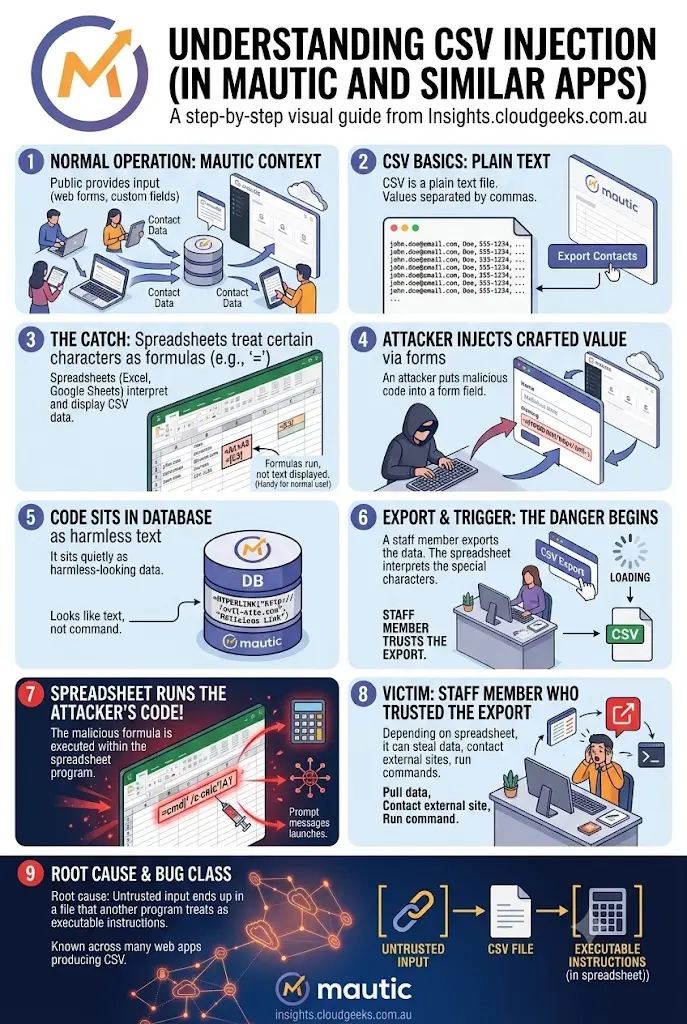
This class of bug is well known across many web apps that produce CSV files. The root cause is the same everywhere: untrusted input ends up in a file that another program treats as executable instructions.
What This Means for You
If you run your own Mautic instance on a version earlier than 2.13.0, your exported CSV files cannot be fully trusted. Any contact field that the public can fill in could carry a hidden formula.
The realistic risk for a small business looks like this:
- A staff member exports a contact list to review subscribers or clean up data.
- They open it in Excel or Google Sheets, like they have done a hundred times.
- A booby-trapped cell runs and tries to leak data, reach an external server, or trick the person into approving something.
You do not need to be a big target for this to happen. Public sign-up forms are exactly the kind of doorway that lets a stranger plant the value in the first place. And because the harmful part only triggers when you open the export, it can sit unnoticed for a long time.
The upside is that this is a known, fixable issue, not a constant live threat hanging over your server. Once you patch and adopt a few safe habits, the door is closed.
How to Protect Your Mautic
Work through these in order. The first step does the heavy lifting.
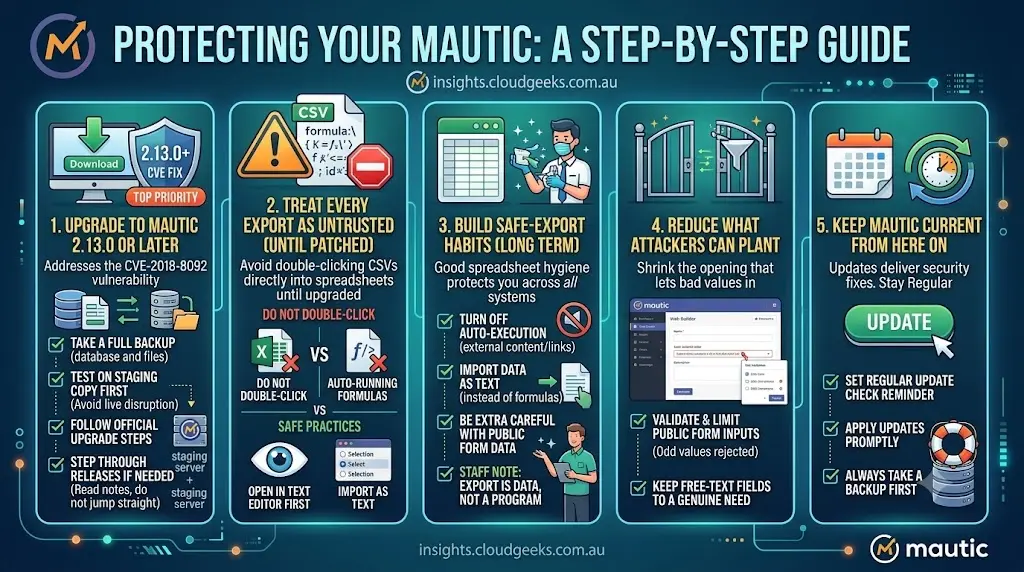
1. Upgrade to Mautic 2.13.0 or Later
This is the headline fix. The flaw was addressed in the 2.13.0 release, so any version from 2.13.0 onward includes the correction. If you are on an older release, plan the upgrade as your top priority.
Before you upgrade:
- Take a full backup of your database and files.
- Test the upgrade on a staging copy first if you can, so a live campaign is not disrupted.
- Follow Mautic’s official upgrade steps for your version path.
If you are several versions behind, you may need to step through intermediate releases rather than jumping straight to the target. Read the release notes for each step.
2. Treat Every Export as Untrusted Until You Have Patched
Until the upgrade is done, tell your team not to open exported CSV files by double-clicking them straight into a spreadsheet.
- Open the file in a plain text editor first to eyeball the contents.
- Or import it into your spreadsheet as text, rather than letting the program auto-run formulas.
3. Build Safe-Export Habits for the Long Term
Good spreadsheet hygiene protects you even after patching, and across any other tool that produces CSVs.
- In your spreadsheet program, turn off or limit automatic execution of external content and links where the setting exists.
- When importing, choose the option to bring data in as text rather than formulas.
- Be extra careful with files built from public form submissions.
- Keep a short internal note reminding staff that an export from any system is data, not a program to run.
4. Reduce What Attackers Can Plant
You can also shrink the opening that lets bad values in.
- Validate and limit what your public forms accept, so odd values are rejected at the door.
- Keep your number of public, free-text fields to what you genuinely need.
5. Keep Mautic Current From Here On
Most security fixes arrive through updates. Set a regular reminder to check for new Mautic releases and apply them promptly, with a backup taken each time.